This version of the order form is not public yet.
There is a newer version of this order form that is not public yet.
Your Order
Your Details
Payment
Product image

The Ultimate Gradient Map Collection

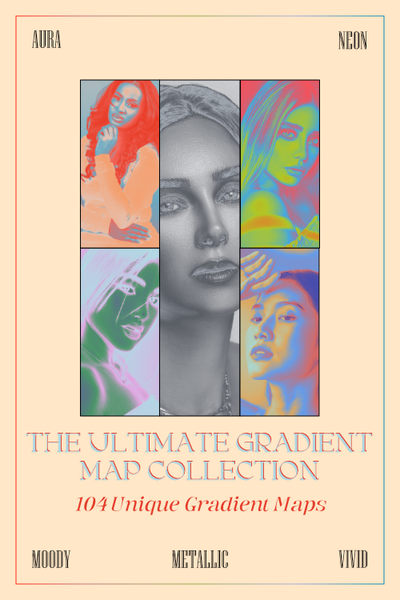
This gradient map pack was created in Affinity 3 and contains a collection of 104 unique gradients from the following packs: Aura, Moody, Neon, Viivid, and Metallic.

This gradient map collection is a digital product that you can download; it can be a great resource for both photographers and artists. You should be able to use them in Affinity, Canva, Adobe Photoshop, Procreate, GIMP, Clip Studio Paint, Ibispaint, Corel PaintShop Pro, and Krita. 

For photographers:

Gradient maps can help you create:

  • cinematic color grading,
  • high-quality black and white conversions,
  • contrast boosts,
  • specific color corrections,
  • and help with split toning.

For artists:

Gradient maps can help you:

  • color grayscale art,
  • boost color harmony and contrasts,
  • access quick color variations,
  • and create custom glow effects.

Even though Affinity doesn't have a designated file type for exporting gradient map adjustments, there is a way to work around that.

For this pack, specifically, each gradient map adjustment was added to an image layer and then saved as a .psd (Adobe Photoshop) file to preserve editability.

You can preview individual gradient maps by toggling the visibility icon next to their names; then, from there, you can save each gradient map as a preset.

If you find this appealing, then my Ultimate Gradient Map Collection may be the perfect addition to your workflow!

REFUND POLICY:

You can request an unconditional refund at any time within a 60-day window.

Price
$84.00
ProductPrice
Product image

The Ultimate Gradient Map Collection

Quantity: 1

This gradient map pack was created in Affinity 3 and contains a collection of 104 unique gradients from the following packs: Aura, Moody, Neon, Viivid, and Metallic.

This gradient map collection is a digital product that you can download; it can be a great resource for both photographers and artists. You should be able to use them in Affinity, Canva, Adobe Photoshop, Procreate, GIMP, Clip Studio Paint, Ibispaint, Corel PaintShop Pro, and Krita. 

For photographers:

Gradient maps can help you create:

  • cinematic color grading,
  • high-quality black and white conversions,
  • contrast boosts,
  • specific color corrections,
  • and help with split toning.

For artists:

Gradient maps can help you:

  • color grayscale art,
  • boost color harmony and contrasts,
  • access quick color variations,
  • and create custom glow effects.

Even though Affinity doesn't have a designated file type for exporting gradient map adjustments, there is a way to work around that.

For this pack, specifically, each gradient map adjustment was added to an image layer and then saved as a .psd (Adobe Photoshop) file to preserve editability.

You can preview individual gradient maps by toggling the visibility icon next to their names; then, from there, you can save each gradient map as a preset.

If you find this appealing, then my Ultimate Gradient Map Collection may be the perfect addition to your workflow!

REFUND POLICY:

You can request an unconditional refund at any time within a 60-day window.

$84.00
Total$84.00